Is CSL Audit Trail free?
Yes. It's a free OpenCart 3 plugin from OpenCart Greece.
CSL Audit Trail keeps the old and new value of every important change, with the admin, IP and request behind it. Database triggers also record edits made by third-party modules, imports, cron jobs or phpMyAdmin, so a change that bypasses OpenCart's own code still shows up.
Alerts, the order timeline, field changes, admin activity, storage and settings. Click a screen to open it full size. The screens show demo data.
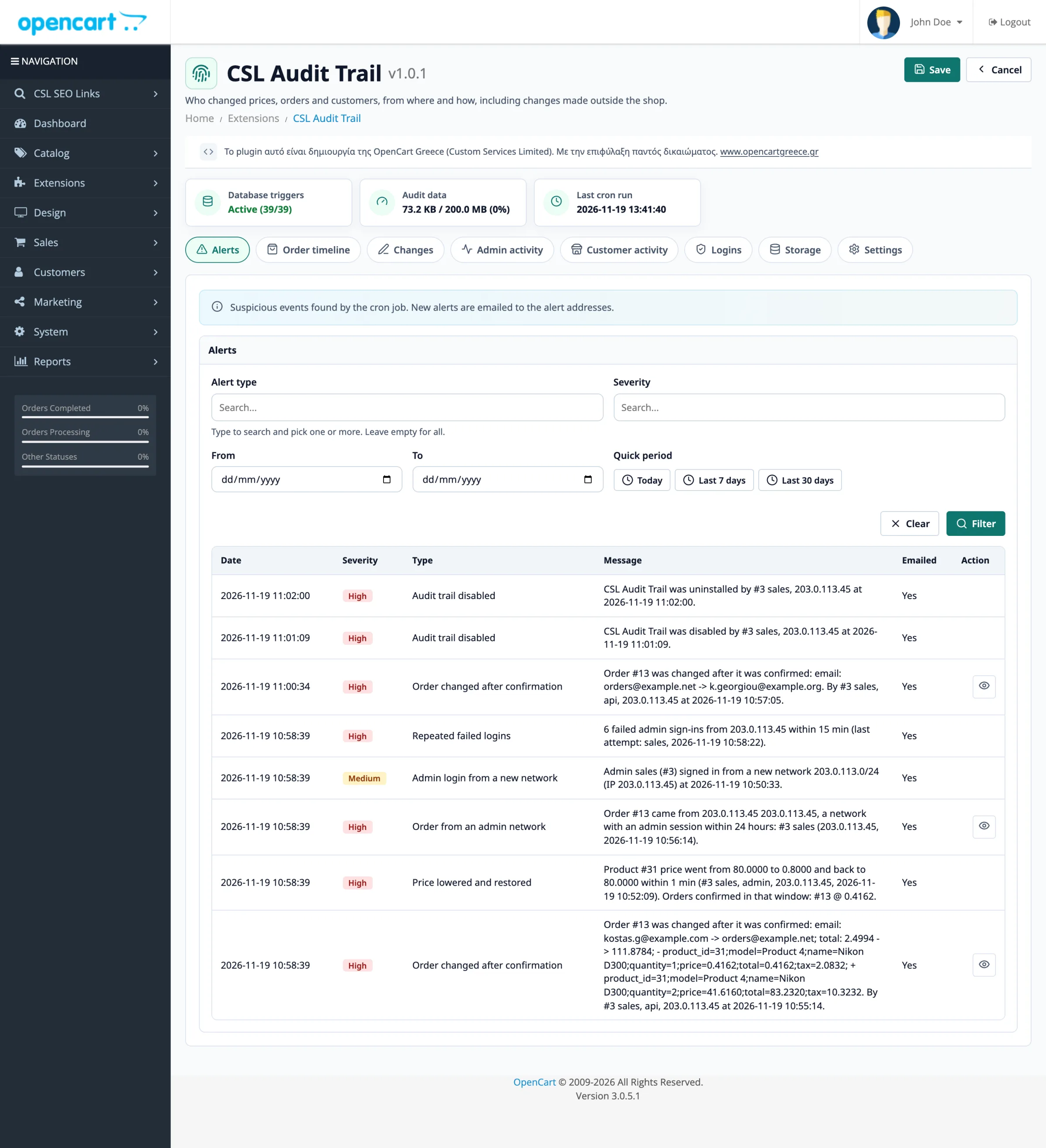
The cron job looks for suspicious patterns and emails new alerts. This list shows a price lowered and restored within a minute, an order placed from an admin's network and an order edited after the buyer confirmed it.
Enter an order number to see what the buyer confirmed, every later edit, who made it, and the shop price of each product at that moment.
Old and new values written by the database triggers. Filter by table, field, admin user, source, row, IP or date.
Every admin and API request with user, IP, session reference and redacted parameters. Here it is filtered to order and product edits that changed data.
The size of each audit table, how many rows it holds and how long they are kept.
Retention per data type and a total size cap. Each value has a slider, a plain-language summary, its default and a reset button.
How large a price drop counts, how quickly the restore must follow, how many failed logins raise an alert, and more.
Each trigger and its status. If the database user cannot create triggers, the screen says why, and the repair button tries again.
It covers the places where money and customer data change. Plain page views are only counted per day, so the log stays readable and small.
MySQL triggers store the old and new value of each field for products, specials, discounts, orders, order lines, customers, addresses, transactions, reward points, coupons, admin users and user groups. A change made by an import, a cron job, a third-party module or phpMyAdmin is marked as made outside the shop, with the database user and connection.
When a buyer confirms an order, the plugin stores each line with its unit price, shop price, special and discount, plus the total, email, phone, IP, browser and payment method. It takes another snapshot before and after every admin edit.
One screen per order with its snapshots, field changes, the admin and API requests that touched it, price changes of its products around the order time and admin activity from the buyer's IP or network.
Each admin request with user, IP, forwarded IP, browser, route, status and duration. Order edits made through OpenCart's API are tied to the admin who made them. Passwords, tokens, keys and card numbers are redacted before anything is stored.
Account, checkout and payment actions, plus admin and customer sign-ins, failed attempts, sign-outs, registrations and password changes.
Compact rows, retention per data type and a total size cap in MB. Over the cap, the oldest rows of the largest tables are removed first, in small batches. The Storage tab shows the size of each table.
A cron job checks the log every few minutes and emails new alerts to the addresses you set. You choose the thresholds.
Installation takes a few minutes. The cron job is what turns the log into alerts.
Upload the plugin with Extension Installer, then refresh Modifications.
Install CSL Audit Trail in Extensions › Modules, enable it and add the email addresses that should receive alerts.
Open Settings and check Database triggers. All of them should show as active. If some are missing, the screen explains what the database user lacks.
Add the cron line shown in Settings to your hosting panel, for example every 5 minutes.
Adjust retention and the size cap to suit your store. By default the audit data stays under 200 MB.
Anyone who has had to answer the question “who changed this?” after the fact.
Store owners who share admin access with staff, agencies or freelancers.
Shops that edit orders after checkout, or deal with chargebacks and need to show what the buyer confirmed.
Developers and agencies whose imports, ERP syncs or third-party modules write straight to the database.
If the log already shows something you don't like, or your store has an unusual setup, our team can help.
We go through the audit trail, server logs and orders with you and work out what happened and who did it.
Hosting without trigger permissions, custom checkouts and heavy imports sometimes need adjustments. We make them.
Shared accounts, old users and broad permissions are where trouble starts. We help you tidy them up.
Yes. It's a free OpenCart 3 plugin from OpenCart Greece.
We tested it on OpenCart 3.0.2.0 to 3.0.5.1 with PHP 7.3 to 8.5, MySQL 8.4 and MariaDB 10.3, 10.11 and 11.4, including Journal3 Quick Checkout.
No. Storefront page views are counted per day instead of stored one by one, each data type has its own retention, and a total size cap removes the oldest rows in small batches. The default cap is 200 MB.
The plugin still records admin and storefront activity, logins and order snapshots. The Settings tab shows which triggers are missing and why, for example a missing TRIGGER privilege or binary logging that needs log_bin_trust_function_creators. Once the host fixes it, the repair button creates them.
No. Passwords, tokens, keys and card data are redacted before a request is saved. For admin and customer passwords it only records that the value changed.
Yes, for alerts, retention and the size cap. Recording works without it, but nothing is emailed or pruned until the cron job runs.
The triggers and events are removed and the alert addresses get an email about it. The recorded data stays in the database in case you need it later.